
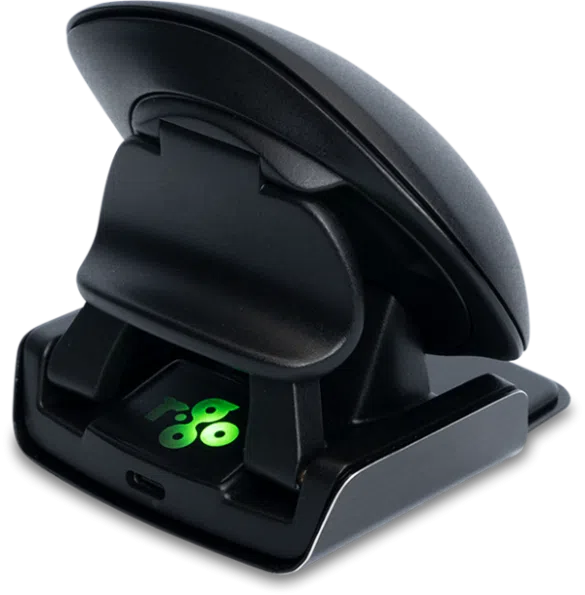


Ambidextrous design

Foldable

With break indicator

For left- and right-handed use

Ambidextrous mouse

This vertical mouse has a special feature: it is ambidextrous. As the name Twister suggests, this mouse has a “twist”, it contains a special switch & fold mechanism. With 1 easy twist, you can operate the mouse with the right hand one moment and then switch to the left. By switching between your left and right hand, you distribute the load over two hands and prevent overloading one hand. Are you left-handed and do you share your workspace with a right-handed colleague or roommate? Then you no longer need an extra mouse with this Twister!

Benefits

R-Go Twister Ambidextrous mouse

  • Vertical ergonomic design
  • Easy switch between left and right hand
  • Foldable: ideal to take it with you
  • With pause indicator LED
  • Can be personalized
  • Can be used both wireless (with Bluetooth connection) and wired
  • Made of 100% recycled plastic and aluminum

Foldable

Easy to carry

Thanks to its multifunctional patented switch & fold system, the Twister is also foldable. In its flat shape, you can easily take this vertical mouse anywhere and keep working ergonomically.

Helps you remember to take a break

With break indicator LED

The Twister, like our Break products, has a break indicator LED. The integrated break software controls this light based on actual mouse use. Different colours indicate if you are working healthily. Green light means you are working healthily, orange means you need a short break. If the LED turns red then you have been working too long. By regularly taking short breaks, you prevent pain symptoms such as RSI and stay fit and focused during your working day.

All you need to know

Description

This vertical mouse is ambidextrous, so it is suitable for both left- and right-handed people. Thanks to the patented switch & fold system, the Twister can be changed from a left-handed to a right-handed mouse and vice versa with one move. By regularly alternating between your left and right hand, you distribute the load on both hands and prevent annoying complaints such as RSI. In addition, the mouse is foldable, so it is easy to take with you. So you can work ergonomically anywhere. The Twister mouse also helps you remember when it is time for a short break. The LED indicator is controlled by our Break software and indicates just how healthy you are working, based on actual mouse use. This mouse can be used either Bluetooth or wired. The total battery time of the mouse after fully charging is up to 2 months (with average use).

Certified

Approved by experts

We strive for ergonomic solutions that suit everyone, regardless of your height, posture and left- or right-handedness. Our new products are assessed by external ergonomists and a test panel of users. Since June 2022, our ergonomic mice, Break keyboards, Riser laptop stands, monitor arms, document holders and Treepod laptop and tablet stand are also AGR certified. In addition, we won the Benelux Office Award for the Break software and our Viva laptop bag.

FAQ

Veelgestelde vragen

Category: HE Break

Yes, you can personalize the mouse buttons. For Windows: This can be done using our R-Go Break software. This software allows you to assign the most frequently used functions to the mouse buttons. For MacOS: There are a number of options for MacOS. If you only want to configure the side buttons (Buttons 4 and 5) to the ‘Back’ and ‘Forward’ functions, the SensibleSideButtons program is the best option. This program can be downloaded for free from sensible-side-buttons.archagon.net. Another option is USB Overdrive, which you can download from usboverdrive.com. A third, paid option is Steermouse. More information can be found at www.plentycom.jp/en/steermouse.

Category: HE Break

You can receive a new Bluetooth dongle. Please contact us for this. Plug this dongle into your computer, turn on the mouse and press and hold the pair button for 5 seconds. The R-Go Bluetooth mouse will automatically connect to your computer.

Categories: HE Break Twister

Download the free Break LED controller here and personalize your breaks.

Categories: HE Basic HE Break Twister

The DPI button is located on the bottom of the mouse and is labeled ‘DPI’. 1 click changes the DPI 1 time. The DPI can be adjusted from 500-1750. Tip: A lower cursor speed encourages mouse movement from the arm and prevents stressful repetitive movements from the wrist.

– Go via the Windows menu to ‘Settings’ and click on ‘Devices’.

– See if the row displayed says ‘Bluetooth’

– If so, check whether Bluetooth is really ‘on’

Note: Now do not use a Bluetooth dongle, otherwise no connection will be possible!

Category: HE Break

Measure the distance between the edge of your wrist and the tip of your middle finger. If this is smaller than 6.5 inch (165 mm) then you have size S. If it is larger than 7.3 inch (185 mm), you need size L.

Categories: HE Basic HE Break Twister

– From the Windows menu, go to ‘Settings’ and click on ‘Devices’.
– Switch Bluetooth to ‘on’.
– Ensure that your new device is sufficiently charged.
– Press and hold the sync button on the bottom of the device until the blue light blinks.
– Select the mouse from the displayed row on the computer screen to connect it to the computer.

Categories: HE Basic HE Break Twister

This is not due to the mouse, but to the computer. There are often 2 causes for this:

-Multiple Bluetooth devices are connected to the computer. As a result, the computer can occasionally process the Bluetooth information from the mouse with a delay. The mouse cursor then seems to stutterer. This usually resolves itself within a minute and the mouse will work normally again.

– The computer has many programmes to load at the same time. As a result, the mouse’s Bluetooth information is processed with lower priority and thus delayed. Usually this resolves itself within a minute and the mouse will work normally again.

Categories: HE Basic HE Break

Yes, that is correct. Our wireless products work via Bluetooth. You only need to pair your mouse once with your computer.

Categories: HE Basic HE Break

The HE mouse is compatible with Windows/Mac OS.

Category: HE Break

By making the mouse lighter, you need less force and therefore less muscle tension to move the mouse.